Parameter Settings
Description
Section titled “Description”When a device’s configuration needs to be modified but local operations are not possible, you can modify the configuration remotely using the following two methods:
Modifying Parameter Configurations via TTS Commands Sent Through the Platform
Section titled “Modifying Parameter Configurations via TTS Commands Sent Through the Platform”-
Go to the
IOTsection, click the Monitor or Device interface, enter the Device ID, locate the corresponding device, and send a modification command to that device.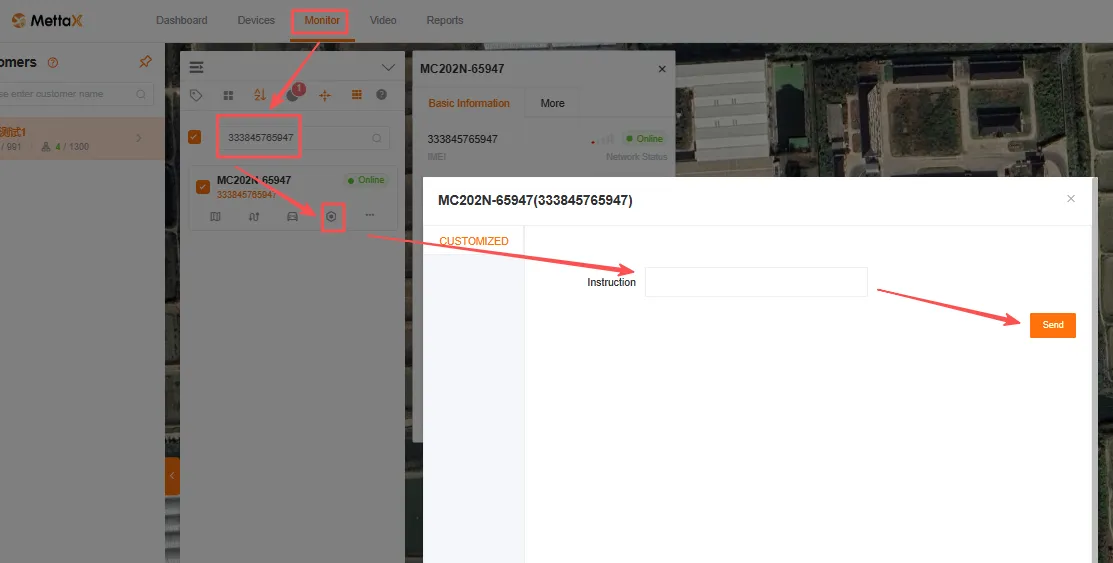
-
Refer to the documentation examples for relevant commands, or view and download them.
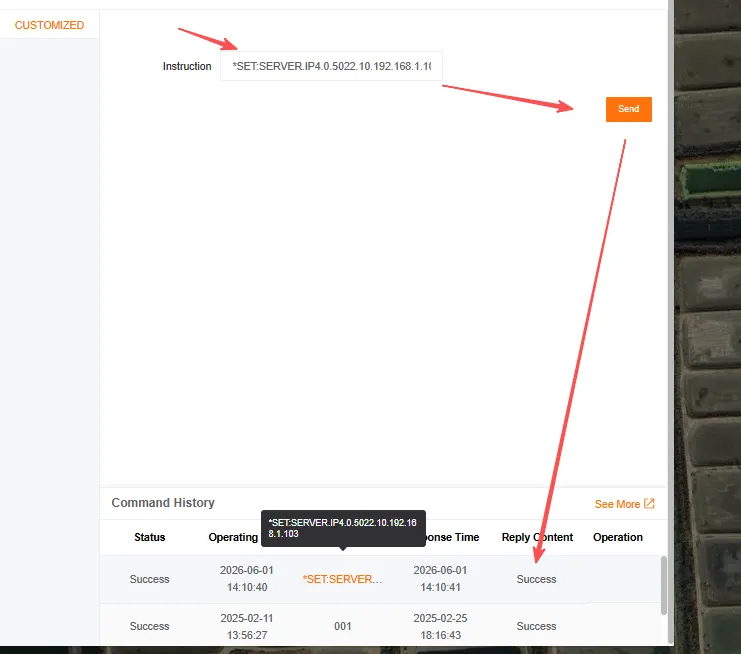
TTS CommandsCore Function Core Command Format Terminal Parameters Set central server IP, port, protocol, and GPS reporting interval *SET:SERVER.IP_Center-ID.Protocol.Port.GPS-Reporting-Interval.IPTerminal Basic Settings Configure license plate number, terminal ID, license plate color, and device ID *SET:JTBASE.LINE.License-Plate.Terminal-ID.Color.Device IDVehicle Information Set VIN, engine number, license plate type, device model, province/city ID, etc. *SET:JTBASE.GENER.VIN.Engine-Number.License-Plate-Type.Manufacturer ID.Device Model.Province ID.City ID.Language.GUI TransparencyMain Stream Configure video channel enablement, resolution, frame rate, video quality, audio, and mirroring *SET:VIDEO.MAIN Channel Number.Enable.Resolution.Frame Rate.Video Quality.Audio.MirrorBasic Settings Configure video format, recording mode, camera type, display resolution, and input type *SET:VIDEO.BASE. Video Format.Recording Mode.Camera Type.Display Resolution.Preview Mode.Input Type.Preview ChannelStorage Settings Configure recording duration, delay, disk purpose, retention period, capacity threshold, etc. *SET:STORE.Recording Duration.Delay.Disk Purpose.Retention Period.Retention Enabled.File Upload.Capacity Threshold -
Command Send and Response
Modifying Parameter Settings for SMS Sending
Section titled “Modifying Parameter Settings for SMS Sending”-
Command Issuance Conditions
- The SIM card must be able to receive SMS messages
- The device must be able to make calls normally; check the dialing status under System Settings > Network Settings
-
Examples, Viewing, and Downloading of Related Command Reference Documents.
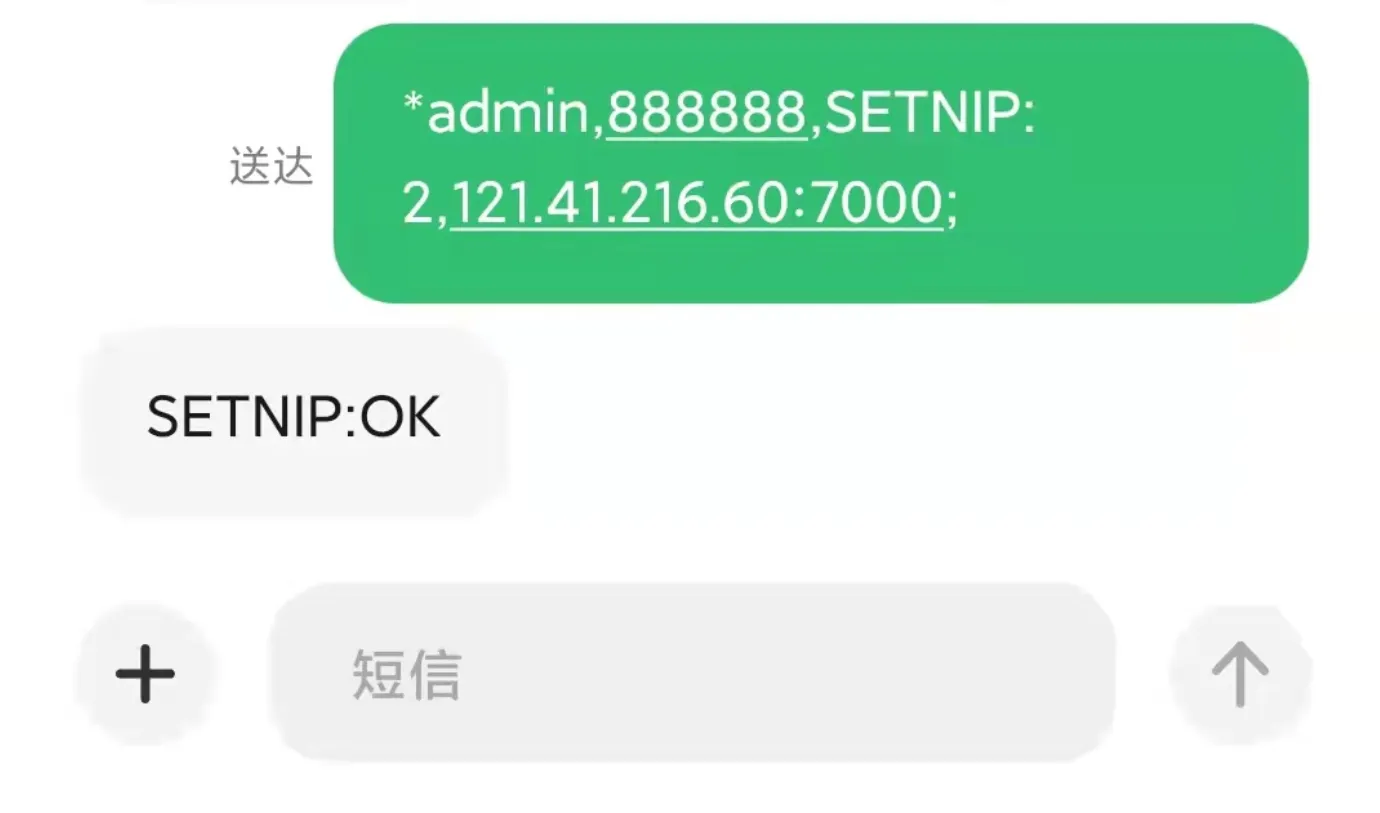
Configure SMS CommandsCommand Name Core Command Format Server Configuration Central Server Parameter Settings SETNIP:n,mainip:port,bakip;Network Configuration 4G Parameter Settings SET4G:switch=,type=,apn=,servercode=,user=,passwd=Network Configuration WiFi Parameter Settings SETWIFI:switch=,authmode=,encrypt=,purpose=,dhcp=,ssid=,pwd=,ip=,mask=,gw=Service Configuration FTP Service Parameter Settings SETFTP:ip=,port=,user=,pwd=Protocol Configuration Central Protocol Parameter Settings SETPROTOCOL:protocol1=,protocol2=,protocol3=,protocol4=Standard General Format for Status SMS Commands:
*admin,888888,command content;Status SMS CommandQuery Core Content GETSTATEBASE Device Basic Information: Voltage, Device ID, ACC Status, Lock Status, IO Status, GPS Status, License Plate Number, SN Number, etc. GETSTATEVER Device Version Information: App Version, MCU Version GETSTATE4G 4G Module Information: Module Status, SIM Card Status, Signal Strength, IMEI, Dialing Status, Dialing IP GETSTATEWIFI Wi-Fi module information: Module presence, SSID, signal strength, IP address GETSTATENET Center connection status: Connection status for 4 center servers (0=Not connected/1=Connected) GETSTATEVIDEO Video status information: Video loss status, recording status GETSTATESTORE Storage status information: Status of SD card, hard drive, and USB storage (0=Not present/1=Normal/2=Abnormal) GETSTATEALARM Device alarm information: IO alarm, accelerometer alarm, speed alarm, voltage alarm, motion detection alarm status Control SMS CommandsCore Function Command Format REBOOT Device reboot; the value is the reboot delay in seconds (must be ≥20 seconds) REBOOT:20;CALLBACK Device callback; parameter is the callback phone number (device must support phone functionality) CALLBACK:1332222; -
Command Send Response